How to Change the Username from an Email Address to an Account Name
Here are the directions for making the update to the username from an email address. First, you will need to go to the content site web.config file and search for the attribute that reads:
useEmailAsUsername="true"
You can simply change this to "false" and have separate usernames and e-mail addresses.

Now you have a Username and E-mail Address field in the registration form.
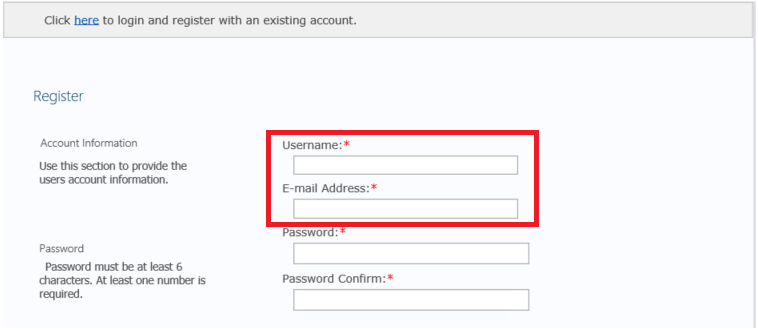
If you have decided to keep the default user email address as the username, you might notice that the default ExCM sign-in screen shows “User Name:” instead of “Email:”. What if you want to change the verbiage on the sign-in screen to show “Email”? Here's how you can make that change.
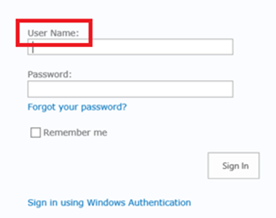
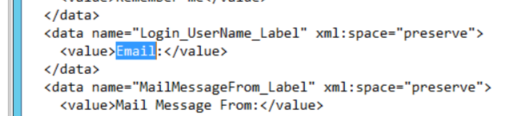
Browse out to "C:inetpubwwwrootwssVirtualDirectoriesCOMPANYURLApp_GlobalResources" and open the excm.en-US file and make the appropriate change.
.png?Policy=eyJTdGF0ZW1lbnQiOlt7IlJlc291cmNlIjoiaHR0cHM6Ly9kemY4dnF2MjRlcWhnLmNsb3VkZnJvbnQubmV0L3VzZXJmaWxlcy8xMDkwLzQ5ODgvY2tmaW5kZXIvaW1hZ2VzL2ltYWdlKDE2KS5wbmciLCJDb25kaXRpb24iOnsiRGF0ZUxlc3NUaGFuIjp7IkFXUzpFcG9jaFRpbWUiOjE3ODg2OTE5MzV9fX1dfQ__&Signature=oYtFEEg5usJQqzi~pT6NjkpGPu5L~G17nQ-2i79C15IcBCPZOUOwus1MduDEXqnvqYvWBRpU01YX-PMs93W4G0QBeP5zeJUtOT6jgLod8RMrZFaUgT0S2lixYD8t7-r-Dxv5EqIrsytiW63FMXtgfMtIEznuIyhhyCIcqMCbXvGKb6v0XQ1rYTWfCbVmQDTX7sjC138XpmSf5r~YErLYbFhQZafgIujRt6v-5JYRLpmdiDMlxv4BV~YwREeN-RHMjMT96MQJ~jDyyJevfdL-HBmhfyJW5XLYbxZLkKtDiGCDn50r~f8StFHicfx7CQBDgqQeI5Xgm3VCkrSkmP51AA__&Key-Pair-Id=K2TK3EG287XSFC)
Once you have opened the file you can run a search for “User Name”, then look for the "<value> User Name: <value>" and change “User Name” to “Email”. Next, save the file, and run an IIS reset.
.png?Policy=eyJTdGF0ZW1lbnQiOlt7IlJlc291cmNlIjoiaHR0cHM6Ly9kemY4dnF2MjRlcWhnLmNsb3VkZnJvbnQubmV0L3VzZXJmaWxlcy8xMDkwLzQ5ODgvY2tmaW5kZXIvaW1hZ2VzL2ltYWdlKDE3KS5wbmciLCJDb25kaXRpb24iOnsiRGF0ZUxlc3NUaGFuIjp7IkFXUzpFcG9jaFRpbWUiOjE3ODg2OTE5MzV9fX1dfQ__&Signature=Lltc2T~rzcY9uySxxmYkszwAAC4EMub4eR39TdMk6eQj4XRfO0m5L84YzBGy5ZsMy3-bIqRWYycI8lGpnW5FNW12F4ySMWVdapAn3eTGTsP3DECRzj5oyAQ4Y81tk0BwDxHR7p7jaGCgxbCgkyGIGoJOWWjYl8tE6F7QIzxenJy9Ufyrk9wRpderSFF8bce4vq5cboByO1Wev6CwaQhPA-TbfCtLLHCskARpht~ILDVR8VSsClgkQPYwYJSBTG90T5sD6KJhoA2Ii4BVkUafHgGz-MlT7qHHa37bFiAvp~ZN4ajmzJD72Mwi7SEoPGMrHMLGQtbjLy8u0pJnx4m9pw__&Key-Pair-Id=K2TK3EG287XSFC)
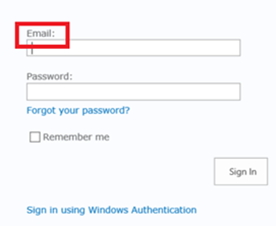
Refresh your browser and you should see that the sign-in page now shows “Email:”, which will hopefully make things less confusing for the end user.
©2019 PremierPoint Solutions. All Rights Reserved.